
Reverse Engineering MobiScribe .note Files
I set out to decode MobiScribe .note files so I could render and export true vector strokes instead of relying on rasterized PDF/PNG exports. This is a summary of the investigation and the first working decoder pipeline.
The result is my nNoteDecoder
1) Identifying the Container
I started with a sample .note file. My first step was to determine the file type with the Unix file utility. It reported:
MobiOriginFile.note: POSIX tar archive
That confirmed the .note file is a tar container (not just a random binary). In other samples I also saw gzip‑wrapped tars, so the reader needs to handle both plain tar and gzip+tar.
2) Inspecting the Archive Contents
Next I listed the archive entries to see what was inside:
indexquickOpen.jsoncustom_bg_mapping.jsonpage_<uuid>.page(multiple)strokeView_<uuid>.pngOcrResult_<uuid>.json
The .page files were the main target: they contain the raw vector strokes. The PNG “strokeView” files are just raster previews, which confirmed that the vector data must exist elsewhere.
3) Reverse‑Engineering the App
I decompiled the MobiScribe nNote APK using apktool. Inside the decompiled source, I noticed substantial reuse of the open‑source “android‑quill” project (Quill) by Volker Braun. That became the key to the binary format.
In the Quill source, I found the Book and Page persistence logic. The Page class writes/reads data using DataOutputStream/DataInputStream. The critical part is the Page(DataInputStream in, TagManager tagMgr, File dir) constructor and Page.writeToStream(...). This is the binary layout I needed to reproduce.
4) Mapping the Binary Structure
From the Quill code, I confirmed the broad layout:
- Page header (version, UUID)
- Tag set data
- Paper type / aspect ratio
- Images
- Strokes
- (Optional) line art and text blocks
The MobiScribe .page files do not match Quill’s version numbers exactly, but the sequence of fields and data types is strongly correlated. This gave me a realistic parsing strategy even if some fields were vendor‑specific.
5) Locating Stroke Data by Header
Rather than brute‑parsing everything up‑front, I searched the .page binary for repeating patterns that could indicate stroke blocks. I found a consistent marker sequence preceding stroke data:
00 00 00 00 04 00 00 00 01 00 00
Immediately after this marker, there is a 2‑byte big‑endian count, followed by count triples of big‑endian floats:
[x, y, pressure] × count
Each triplet represents one sampled pen point: x and y are the normalized page coordinates, and pressure is the normalized pen pressure value. The floats are typically in the 0..1 range and match Quill’s stroke encoding. This alignment was the practical breakthrough: by detecting this marker and reading triples, I could recover the stroke geometry reliably.
To verify the marker in a repeatable way, I wrote a small PHP scan that searches for the byte pattern and reads the point count right after it:
<?php
$data = file_get_contents("page_80c37e23-e160-46e7-a1c8-37d00f22ce95.page");
$marker = hex2bin("0000000004000000010000");

function readFloatBE(string $bytes): float {
    $value = unpack("G", $bytes)[1]; // big‑endian float
    return $value;
}

$offset = 0;
while (($pos = strpos($data, $marker, $offset)) !== false) {
    // count is 2 bytes big‑endian immediately after the marker
    $countBytes = substr($data, $pos + strlen($marker), 2);
    $count = unpack("n", $countBytes)[1];
    printf("marker @ 0x%X -> %d points\n", $pos, $count);

    // dump the first few points
    $start = $pos + strlen($marker) + 2;
    $max = min($count, 3);
    for ($i = 0; $i < $max; $i++) {
        $base = $start + $i * 12;
        $x = readFloatBE(substr($data, $base, 4));
        $y = readFloatBE(substr($data, $base + 4, 4));
        $p = readFloatBE(substr($data, $base + 8, 4));
        printf("  p%d: x=%.6f y=%.6f p=%.6f\n", $i, $x, $y, $p);
    }

    $offset = $pos + 1;
}
This confirmed that each marker is followed by a plausible point count, and the subsequent bytes decode cleanly as big‑endian float triples.
6) Building the Decoder
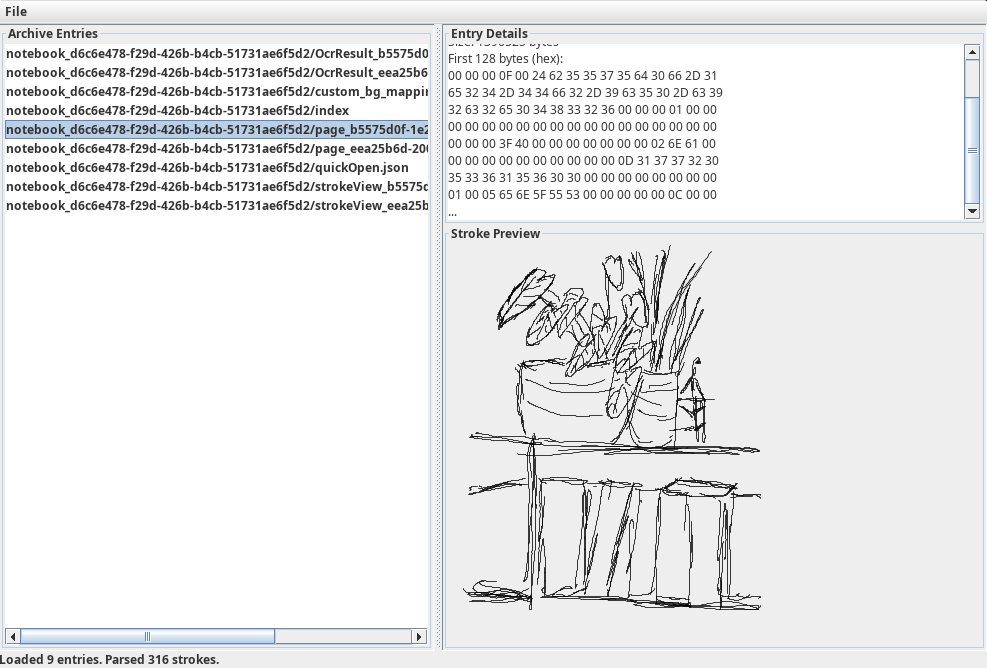
I implemented a minimal Java/Swing application to:
- Read the tar
.notefile - Enumerate the archive entries
- Parse
.pagefiles for stroke blocks - Visualize strokes in a preview panel
- Export the recovered strokes to SVG
The first pass extracted strokes correctly but the SVG export was extremely tiny. This was because the SVG defaulted to a large fixed canvas with a viewBox at (0,0). The stroke coordinates are normalized, so the drawing occupied a fraction of the canvas. The fix was to compute stroke bounds and set the SVG viewBox to those bounds with a small margin. After that, the exported SVG opened at a sensible scale in Inkscape without zooming.
7) Why Quill Was Central
Without the Quill code, I would have had to infer the entire binary format from scratch. The Quill persistence logic provided the field order, data types, and consistent use of big‑endian floats, which made the marker‑based discovery of stroke blocks credible and testable. It also confirmed that the stroke data is stored as sequences of floats with pressure values—matching the decoder results.
8) Current State
The decoder now:
- Loads
.notearchives - Extracts and renders strokes
- Exports to SVG at a reasonable scale
What's not implemented:
- Decode stroke color and thickness (these likely exist in the header adjacent to the stroke blocks) but since I just own the B/W edition of MobiScribe it has little relevance to me right now
- Parse page metadata (paper type, aspect ratio, background style)
- Support multi‑page export and more robust page selection
This is an iterative reverse‑engineering process, but the core result is already useful: vector stroke recovery and SVG export from a native MobiScribe .note file.